Hello and welcome to another WP Companion video tutorial.
In today’s WordPress tutorial we are going to cover the activation and setup of one of the top WordPress plug-ins. This plugin is one that already comes with WordPress when you install it is will see on our demo site FitnessExaminer.com.
The first step is to pop into our WordPress dashboard. Then we navigate to installed plugins. Next we are going to activate this plugin. Before we do that we need to sign up for our Akisment API key. You can signup for your API key here: http://akismet.com/wordpress/. Once you are on the signup page enter all the information needed such as First name, Last name and Email address.
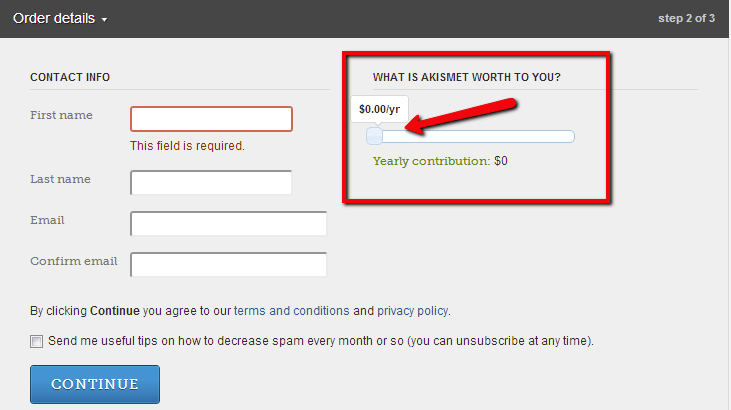
Once you have your API key copy it and keep it in a safe place.
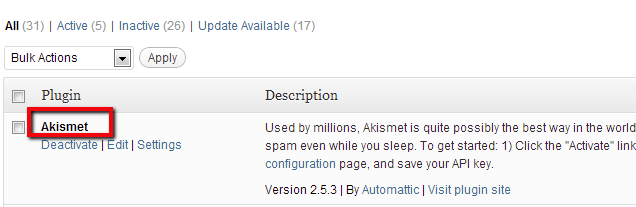
Once we activate the plugin it should prompt us to enter our Akismet API key for it to work.
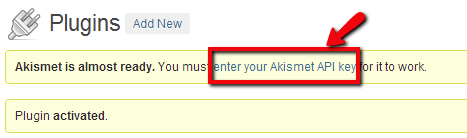
After you click on the “enter your Akismet API key” you can now copy and paste it in the space where I have entered the text, “your API key” as shown below.
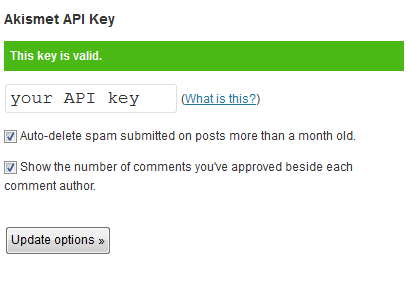
Click on update options to complete your activation.






Speak Your Mind