| WP Security Scan |
| Description: Checks your WordPress website/blog for security vulnerabilities and suggests corrective actions such as Passwords, ?le permissions, database security, version hiding and more. |
| • |
| Go to Plugins, then type in “WP Security Scan” on the search box. Click “Install Now” |
 |
| • |
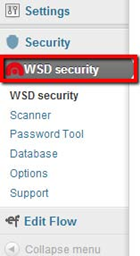
| Once you have installed and activated the plugin in WordPress, click the newly created “WSD security” button on the Dashboard menu. Here you will see 6 links: WSD security, Scanner, Password Tool, Database, Options and Support. |
 |
|
Scanner: This option can scan your WordPress ?les permission. |
 |
|
Password Tool: Here you can test the strength of your passwords. |
 |
| Database: Here you can backup your database or Change database table pre?x to mitigate zero-day SQL Injection attacks. |
| Options: Here you can choose to show or hide the Website DefenderNews dashboard widget. |





Speak Your Mind